Carvera AI — running a CNC from a conversation
An open source skill and local server that lets an AI agent probe, level, index and cut on a Makera Carvera while I keep the go button. Here is what it can do.
I can run my Makera Carvera from a plain-text conversation now. Carvera AI lets an agent probe, level, index and cut on the machine, and it never starts a cut without my go.
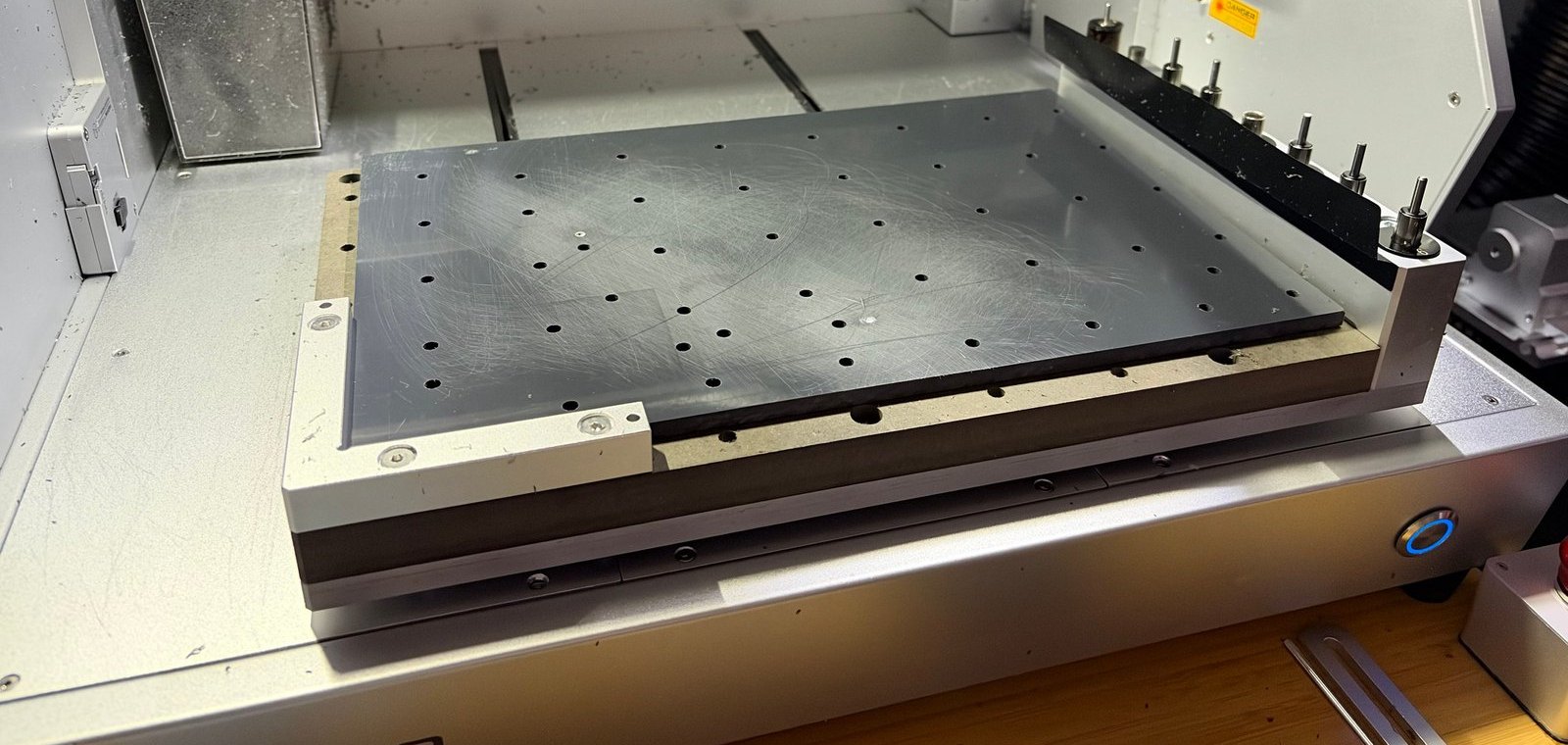
The spoilboard in the picture above was made that way. I described the sheet; the agent worked out the hole positions from Makera's own CAD, routed the tool around the anchor block, wrote the program and the drawing, showed me a preflight, and cut 48 holes in eleven minutes. Everything that made that possible is public and MIT licensed at BlinkingSun/carvera-ai .
Three pieces in one repository
Carvera Control is a small local server. The Carvera accepts one connection at a time over Wi-Fi, and the server holds it, so the web UI, the agent and any script share the same machine instead of fighting over it. It gives the machine a jog and indexing UI, a JSON HTTP API, an MCP server for agents, a program uploader and runner, vacuum and spindle switches, and a simulator good enough to run the whole test suite without a machine.
The skill is a SKILL.md playbook plus two helper commands. It is what turns a general-purpose agent into one that knows this machine: what to read first, how firmware 1.0.3 actually behaves, the safety rules, the indexing math, probing, leveling and running jobs.
The machine kit holds the Carvera C1 specifics: the spoilboard drawing and hole program with the generator behind them, offline leveling tools, and a script that fetches Makera's 3D models from Makera's own repository.
How a session goes
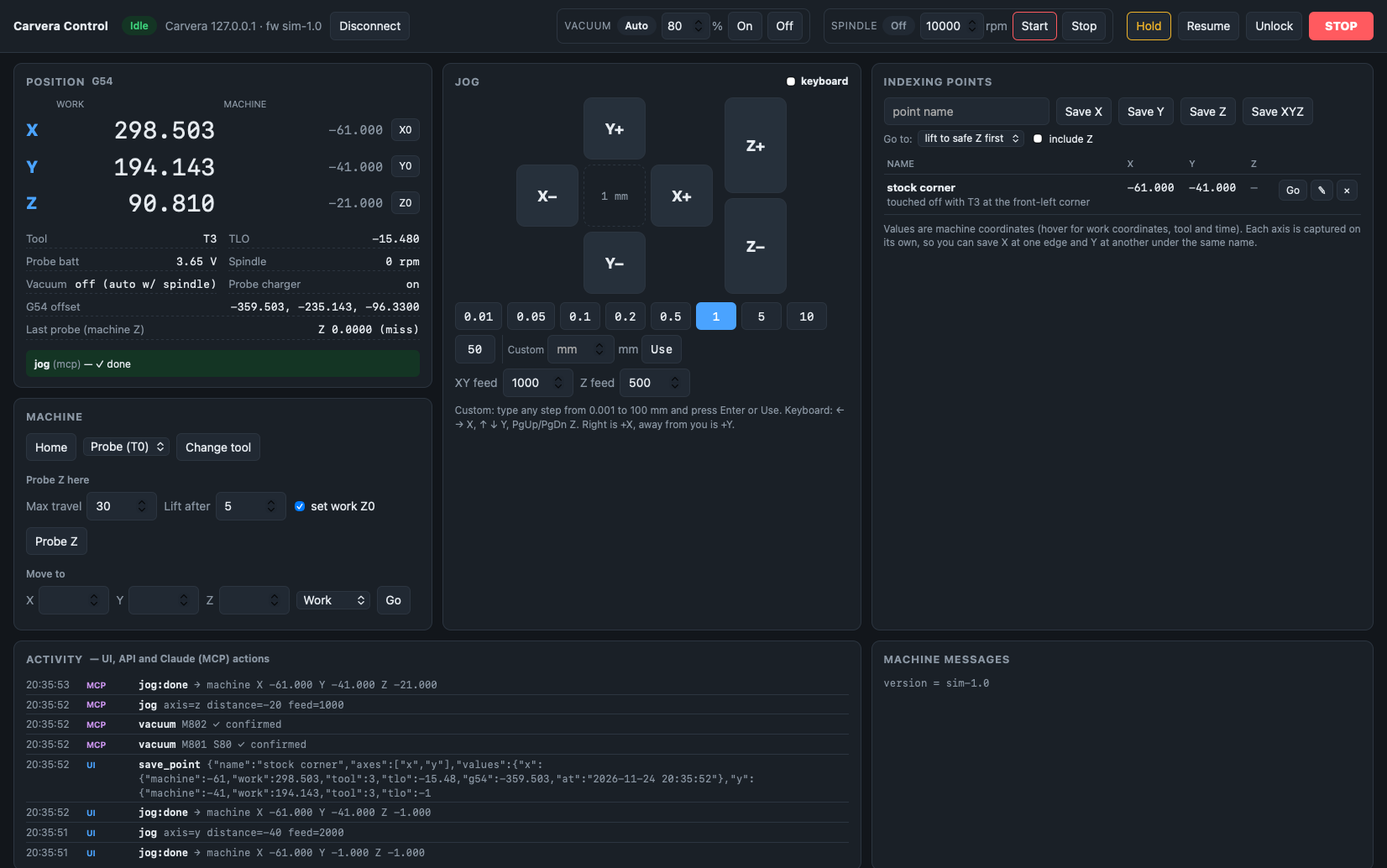
I do the fine positioning by hand in the web UI: jog, touch off an edge with the cutter, save the point. The agent reads the activity log, so it sees what I did without me describing it. It does the planning and the arithmetic, and it acts on the machine when I ask, through the same server, logged next to my own actions.
Starting is one line: /carvera-ai what state is the machine in? The helper starts the server if it is not running, connects, opens the UI, and hands the agent the state, the tool, the position, the offsets, my saved points, my site rules and what I last did.
What it has done on my machine
These are working examples, not hypotheticals.
- "Probe the stock and run my file." It loads the probe, finds Z, and puts the probe back with a slow extra 2 mm plunge, because the firmware's own drop leaves the wireless probe sitting off its charging coil. It uploads the program, checks the machine's copy against the local file by MD5, shows a preflight, and after my go the machine plays it from its own SD card, so a Wi-Fi drop does not stop the cut. While it runs, a kill switch watches the tool and aborts if it leaves the program's envelope.
- "Level it, 5×5." It probes the grid, reads it back and checks it for bad points. The Carvera applies no compensation outside the probed grid, so instead of trusting the firmware it writes a leveled copy of the program, bilinear inside the grid and extrapolated outside, and verifies that copy move by move before running it.
- "Index off these edges." I touch off with the cutting tool and save the points. The agent turns those tool-centre touch-offs into an X/Y shift for the CAM program and proves the mapping before anything moves.
- "Make me a new spoilboard." 335 × 225 mm of 1/4" PVC over the stock bed: 46 bolt holes lined up with Makera's bed pattern and two dowel holes for locating fixtures, all routed around the anchor block. The first dowel holes, at 4.0 mm, were too tight for the pins, so the program in the repo cuts 4.1.
- "Turn the vacuum on" / "start the spindle at 12,000." Switches with read-back from the machine, not just a sent command. With the spindle running I can still jog for manual work; homing, tool changes and probing refuse until it stops.
From a sentence to a part
With Autodesk Fusion's MCP server connected next to it, the agent can work the whole chain from conversation: model the part in Fusion, build the CAM setup and toolpaths, post with Makera's post processor, add what the post leaves out (the onboard vacuum), check the program against my site rules, then probe, level, upload and run it on my go. The rough edges are written down in the repo rather than discovered mid-job; Fusion's Personal license, for one, refuses tool changes in a single post and slows rapids to the cutting feed.
From the phone, at the machine
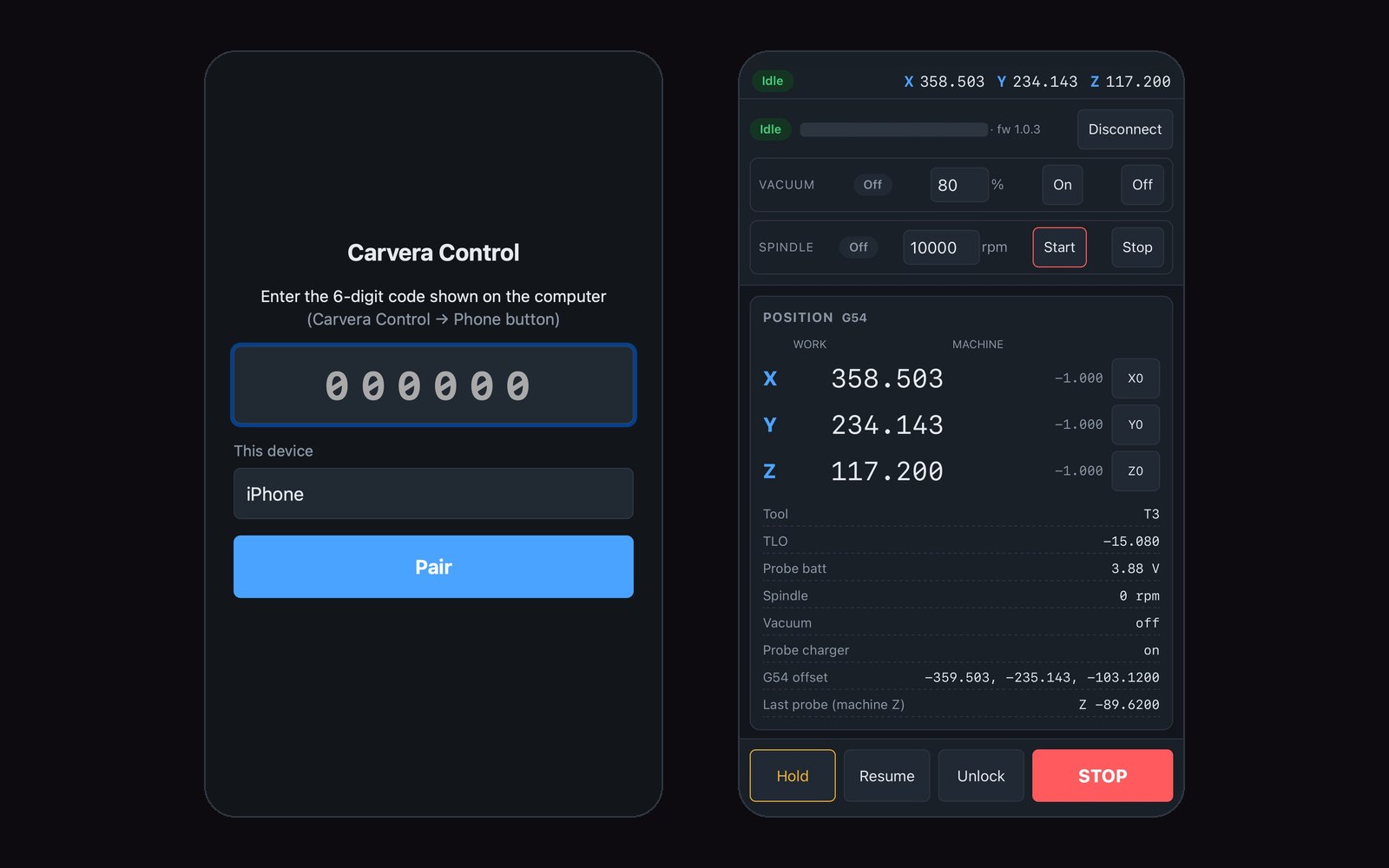
Most of the work happens standing at the machine, so the UI runs on a phone or tablet too. The computer keeps the machine connection; the phone pairs once with a six-digit code and gets a touch layout, with the position pinned at the top, a full-width jog pad, and Hold, Resume, Unlock and STOP in a bar that never scrolls away. It is off by default, and a phone only gets the page's controls: raw G-code and programs stay on the computer. Ask the agent to set it up and it walks you through it, network troubleshooting included.
The rules it works under
A machine with a spinning cutter is not the place for an agent to improvise, so most of the skill is rules.
- It moves the machine only when I ask for that motion, and it says what it is about to send first. A request covers one move, not the session.
- It never starts the spindle unless I asked for a cut. Starting a program counts as a cut: first a preflight (file, tools, origin, time, kill-switch envelope, vacuum), then an explicit "go".
- It re-reads the position and the tool before every motion step. That rule exists because I once jogged the tool over the anchor block in the UI between two of its steps.
- My setup's hazards live in a
site-rules.txtthat is printed at the start of every session. On my machine the tool never goes below the spoilboard top within 5 mm of the dowels, and nothing travels over the anchor at any height. Programs, probe points and leveling grids are checked against those rules before anything uploads. - STOP in the UI is a software stop over Wi-Fi. The machine's E-stop is the real one.
Under the rules sit interlocks in code: travel limits on every jog, a spindle that refuses to start with the probe loaded, a probe battery check before probing, the MD5 match before a run, and the kill switch during one.
Not tied to one agent
The skill is a plain Markdown playbook, the server speaks MCP and HTTP, and the helpers are shell scripts, so any agent harness that can use one of those can drive it: Claude Code, OpenAI's Codex CLI, Grok, Cursor, Gemini CLI, and the MCP clients in VS Code, Windsurf, Zed and others. To be clear about what is proven: Claude Code is the one I have run against the real machine. The others are compatible by protocol.
Try it
You need Python 3.10 or newer (the server uses only the standard library) and a Carvera on your Wi-Fi.
git clone https://github.com/BlinkingSun/carvera-ai.git
cd carvera-ai
python3 -m carvera_control
Then open http://127.0.0.1:17916/ and press Connect. No machine? Run python3 sim/carvera_sim.py in one terminal and python3 -m carvera_control --sim in another for a simulated Carvera. Installing the skill, connecting each harness and setting up the phone are all documented in the repo.
Read the safety notes before you point an agent at a machine. Carvera AI is MIT licensed and not affiliated with or endorsed by Makera. It is one maker's tooling for one machine, shared in case it saves you the same afternoons.